Table of Contents
1. What Is a VPN?
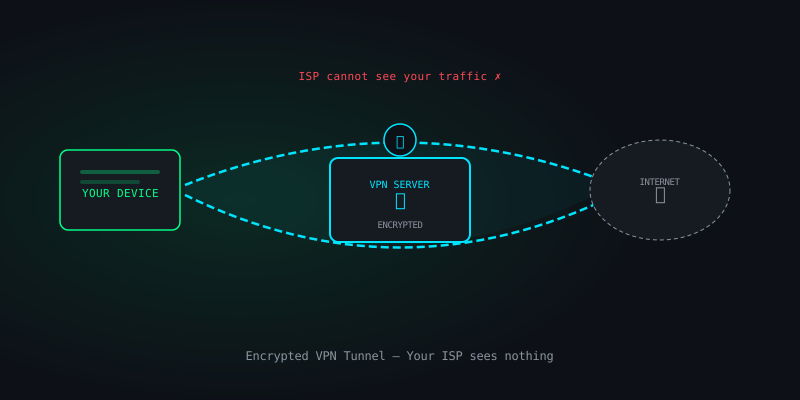
A Virtual Private Network (VPN) creates an encrypted tunnel between your device and a server operated by the VPN provider. All your internet traffic is routed through that tunnel, meaning your ISP sees only that you are connected to a VPN server — not what websites you visit or what data you send.
VPNs were originally designed for corporate use — allowing employees to securely access internal company resources over the public internet. Consumer VPNs repurpose the same technology for personal privacy, geo-unblocking, and protection on public Wi-Fi networks.
The global VPN market is worth billions of dollars and is full of misleading claims. Understanding the technology behind the marketing is essential for making a good choice. If you need stronger anonymity than a VPN provides, read our complete Tor guide.
2. How a VPN Works
When you connect to a VPN:
- Your device negotiates an encrypted tunnel with the VPN server using a VPN protocol (WireGuard, OpenVPN, etc.)
- All outgoing traffic is encrypted and sent to the VPN server
- The VPN server decrypts it and forwards it to the destination on your behalf
- The destination website sees the VPN server's IP address, not yours
- Return traffic flows back through the same tunnel to your device
Your ISP sees: your IP → VPN server IP, encrypted blob.
The destination website sees: VPN server IP, your traffic content (minus identity).
The VPN provider sees: your IP, the destination, and your traffic content.
A VPN does not make you anonymous. It shifts trust from your ISP to your VPN provider. You must trust your VPN provider not to log or sell your data. This is why provider selection and no-log audits matter.
3. VPN Protocols Explained
The protocol determines how the encrypted tunnel is built. The choice affects speed, security, and battery life.
WireGuard
The modern standard. WireGuard has roughly 4,000 lines of code (compared to OpenVPN's 600,000+), making it far easier to audit for security vulnerabilities. It is faster, uses less battery, and reconnects almost instantly when switching networks. Most reputable providers support WireGuard. Choose this when available.
OpenVPN
The long-standing gold standard. Open source, heavily audited, and extremely configurable. Slightly slower than WireGuard but battle-tested over two decades. Use OpenVPN (UDP mode preferred) when WireGuard is unavailable or on networks that block it.
IKEv2/IPSec
Fast and stable, especially good at reconnecting after network switches (roaming between Wi-Fi and mobile data). Widely supported on mobile. The IPSec implementation from some vendors has raised concerns; use only from providers with open-source or audited implementations.
Protocols to Avoid
- PPTP — completely broken, do not use under any circumstances
- L2TP/IPSec — PPTP successor, suspected NSA backdoor, avoid
- Proprietary protocols — if a provider won't disclose how their protocol works, that is a red flag
4. What a VPN Protects
- ISP snooping — your ISP cannot see which sites you visit or what data you send
- Public Wi-Fi attacks — encrypts traffic against eavesdroppers on coffee shop / hotel networks
- Basic IP-based tracking — websites see the VPN server's IP instead of yours
- Geographic restrictions — exit through a server in another country to access region-locked content
- Network-level censorship — bypass ISP-level blocks on websites
5. What a VPN Does NOT Protect
- Browser fingerprinting — websites can identify you by your browser configuration even without your IP
- Account-based tracking — if you are logged into Google or Facebook, they know who you are regardless of IP
- Cookies and trackers — advertising networks track you across sites via cookies and tracking pixels
- Malware — a VPN cannot protect against malicious software on your device
- DNS leaks (if misconfigured) — if DNS queries escape the tunnel, your ISP still sees your browsing
- WebRTC leaks — browsers can leak your real IP through WebRTC even with a VPN active
# Test for DNS leaks (Linux/Mac)
$ curl https://ifconfig.me          # should show VPN IP
$ dig myip.opendns.com @resolver1.opendns.com  # should also show VPN IP

# Test for WebRTC leaks
# Visit: browserleaks.com/webrtc — check that no local IP is shown
6. Understanding No-Log Policies
Every VPN provider claims to have a "no-log" policy. This claim ranges from meaningful to completely meaningless depending on the details. Here is how to evaluate one:
What Should NOT Be Logged
- Your real IP address
- Which servers you connected to
- Connection timestamps and duration
- Bandwidth usage per session
- DNS queries
- Traffic content
What May Be Logged (Acceptable)
- Aggregate, non-identifiable bandwidth statistics for capacity planning
- Account creation date and payment method (required for billing)
Independent Audits
A no-log claim without a third-party audit is just marketing. Look for providers that have been independently audited by respected security firms (Cure53, Deloitte, KPMG). Even better: providers whose no-log policy has been proven by a real court case or law enforcement request they could not comply with because the data simply did not exist.
7. Jurisdiction Matters
Where a VPN company is legally incorporated determines which laws it must comply with. This affects data retention requirements and the ability of governments to demand user data.
Five Eyes, Nine Eyes, Fourteen Eyes
These are intelligence-sharing alliances between countries. A VPN based in a Five Eyes country (US, UK, Canada, Australia, New Zealand) is subject to laws that can compel data disclosure and gag orders. This does not mean such providers are untrustworthy — a genuine no-log policy means there is no data to hand over — but jurisdiction adds a legal layer of risk.
Favourable Jurisdictions
Countries with no mandatory data retention laws and no intelligence-sharing agreements with major surveillance alliances include Switzerland, Iceland, Panama, and the British Virgin Islands. Many reputable providers are incorporated in these locations specifically for this reason.
8. How to Choose a VPN
Apply this checklist:
- ✅ Open-source client or independently audited codebase
- ✅ Published and audited no-log policy
- ✅ Supports WireGuard or OpenVPN (no proprietary-only protocols)
- ✅ DNS leak protection built in
- ✅ Kill switch — cuts internet if VPN connection drops
- ✅ Accepts anonymous payment (cash, Monero) if privacy is critical
- ✅ Based in a favourable jurisdiction
- ✅ Transparent ownership (not owned by a data broker or ad company)
- ❌ Does not sell "lifetime" subscriptions (unsustainable business model)
- ❌ Does not promise "military-grade" or "unbreakable" encryption without specifics
9. VPN Red Flags to Avoid
Spotting a bad VPN is as important as choosing a good one. Pair your VPN choice with good OPSEC habits and a strong password manager.
- Free VPNs — if you are not paying, your data is the product. Many free VPNs sell browsing data to advertisers.
- No audit history — any reputable provider operating for more than two years should have at least one published audit.
- Vague ownership — if you cannot find out who owns the company, walk away.
- Sensationalist marketing — "100% anonymous!", "military encryption!", "hackers hate us!" — these are marketing phrases, not security claims.
- Browser extensions only — a browser extension VPN only protects browser traffic. Your other apps, DNS, and system traffic are unprotected.
A trustworthy VPN is a useful privacy tool that protects against ISP surveillance and public Wi-Fi attacks. It is not anonymity. For stronger anonymity, combine a VPN with Tor and good OPSEC practices.
Related Articles
The Complete Beginner's Guide to the Tor Network
How onion routing works, how to use Tor Browser safely, and what Tor can and cannot protect you from.

OPSEC for Everyday People: Protect Your Digital Life
Threat modeling, compartmentalization, pseudonyms, metadata scrubbing — for everyday people.
Linux Privacy Hardening: A Practical Terminal Guide
UFW, Fail2Ban, LUKS encryption, AppArmor, system-wide Tor routing — step-by-step terminal commands.