Table of Contents
1. What Is Tor?
Tor — short for The Onion Router — is a free, open-source anonymity network run by the non-profit Tor Project. Originally developed by the US Naval Research Laboratory in the mid-1990s to protect government communications, it was released to the public in 2002 and has been maintained by a global community of volunteers and researchers ever since.
At its core, Tor is a tool for separating your identity from your online activity. When you browse the web normally, every server you visit sees your real IP address — which directly maps to your physical location and internet service provider. Tor breaks that link by routing your traffic through a series of volunteer-operated servers around the world, called relays or nodes.
Today, Tor is used by journalists, activists, whistleblowers, privacy researchers, and ordinary people who value their right to browse without being tracked. The Tor network carries millions of connections per day across more than 7,000 relays in over 90 countries. To understand who actually uses it and why, see our article on legitimate dark web user groups.
Tor is completely legal in most countries. Using Tor is not inherently suspicious — it is a privacy tool used by human rights workers, journalists, and security researchers worldwide.
2. How Onion Routing Works
The term "onion routing" comes from the layered encryption Tor applies to your data — like the layers of an onion. Here is what happens when you make a request through Tor:
Step 1 — Your Tor Client Picks a Circuit
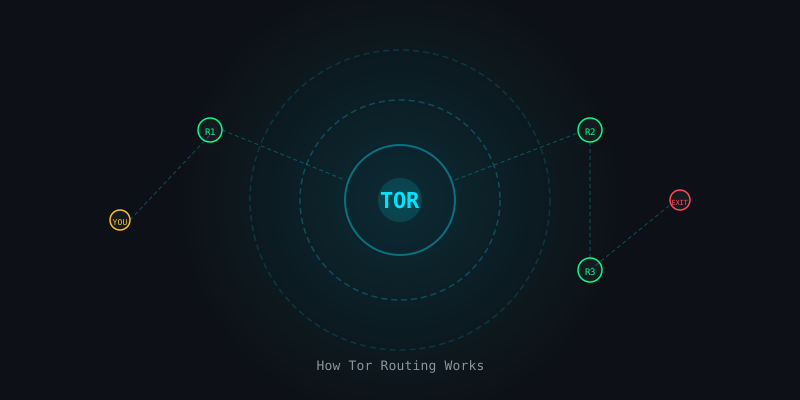
When you connect to Tor, your Tor client (usually Tor Browser) downloads a list of available relays from a set of trusted directory servers. It then automatically selects three relays to form a circuit: a guard node, a middle relay, and an exit node.
Step 2 — Triple Encryption
Before sending your data, your client encrypts it three times — once for each relay in the circuit. Think of it as three nested envelopes:
- The outermost encryption can only be opened by the guard node
- The middle encryption can only be opened by the middle relay
- The innermost encryption can only be opened by the exit node
Step 3 — Peeling the Layers
Each relay peels away its layer of encryption, learns only the next hop in the circuit, and passes the data along. No single relay ever knows both who you are and what you're requesting. The guard node knows your IP but not your destination. The exit node knows your destination but not your IP.
YOU → [encrypt x3] → GUARD NODE
               ↓ (decrypts outer layer, sees: "send to middle relay")
         MIDDLE RELAY
               ↓ (decrypts middle layer, sees: "send to exit node")
           EXIT NODE
               ↓ (decrypts inner layer, sees: "request example.com")
         DESTINATION
3. Guard, Middle & Exit Relays
Understanding the three relay types helps you understand both Tor's strengths and its weaknesses.
Guard Node (Entry Node)
The first relay your traffic touches. It knows your real IP address but has no idea what you are doing on the internet. To reduce the risk of a bad actor being your guard, Tor uses a small set of stable, high-bandwidth relays as guards and rotates them slowly (every few months), rather than picking a new one on every circuit.
Middle Relay
Knows only the guard that sent traffic to it and the exit that it's forwarding to. Knows neither your IP nor your destination. This is the safest relay type to run — it carries no legal exposure because it never connects directly to external websites.
Exit Node
The final relay. It decrypts your request and makes the actual connection to your destination website. The exit node sees your traffic in plaintext if you are not using HTTPS. Exit node operators sometimes receive abuse complaints because external servers see the exit node's IP, not yours. Running an exit node requires careful legal consideration.
4. Using Tor Browser Safely
Tor Browser is the official, recommended way to use Tor. It is a hardened version of Firefox pre-configured to route all traffic through the Tor network and set to resist browser fingerprinting.
Download Only from the Official Source
Always download Tor Browser from torproject.org. Verify the cryptographic signature before installing. Fake Tor Browsers distributed through unofficial channels have been used to de-anonymize users.
Keep It Updated
Tor Browser updates frequently to patch security vulnerabilities. Enable automatic updates or check for updates before sensitive sessions.
Don't Resize the Window
Window size is part of your browser fingerprint. Tor Browser defaults to a standardized size. Resizing it makes you more unique among Tor users.
Always Use HTTPS
Tor Browser includes HTTPS-Only mode by default. Keep it enabled. Your traffic between the exit node and the destination is visible to the exit node — HTTPS encrypts it at that final hop.
Don't Log In to Personal Accounts
Logging into Google, Facebook, or your email while using Tor defeats the purpose. Those services immediately know who you are, regardless of your IP address.
Never open documents (PDFs, Word files) downloaded via Tor Browser while you are online. These files can contain resources that load outside the Tor network and reveal your real IP address. Always open them in a sandboxed environment or offline.
5. What Tor Protects Against
- Website tracking by IP address — destination sites see the exit node's IP, not yours
- ISP surveillance — your ISP sees only that you are connecting to a Tor guard node, not what you are doing
- Network-level eavesdropping — traffic is encrypted between you and the exit node
- Geo-blocking — exit nodes in different countries allow access to geo-restricted content
- Local network monitoring — workplace or school networks cannot see your traffic content
6. What Tor Does NOT Protect Against
This is the most important section for any Tor user to understand.
Browser Fingerprinting (if you modify the browser)
If you install additional extensions, change settings, or resize the window, you may be uniquely identifiable among Tor users even without revealing your IP.
Malware on Your Device
If your computer is compromised, malware can bypass Tor and communicate directly with an attacker's server, revealing your IP. Tor Browser cannot protect against a compromised operating system.
End-to-End Traffic Correlation Attacks
A powerful global adversary who can observe both your entry traffic and the exit node's traffic can statistically correlate the two to de-anonymize you over time. This is a theoretical but real limitation for Tor's anonymity against nation-state actors.
Account-Based Identity
If you log in to any account that identifies you — email, social media, a forum where you have posted personally identifying information — Tor cannot protect your identity. Your account is your identity.
Exit Node Eavesdropping (without HTTPS)
Without HTTPS, the exit node operator can see your traffic in plaintext. Always use HTTPS.
7. Common Mistakes to Avoid
These are the most common ways Tor users undermine their own anonymity. For a detailed look at how real people got caught, see our article on OPSEC failures that led to arrests.
- Using BitTorrent over Tor — it reveals your real IP and clogs the network for others
- Logging into personal accounts during sensitive sessions
- Downloading and immediately opening files
- Installing browser extensions beyond what Tor Browser ships with
- Using Tor Browser on an otherwise compromised or unpatched system
- Confusing "anonymous" with "untraceable" — Tor reduces risk, it does not eliminate it
8. Getting Started Today
Ready to try Tor? Here is the simplest path:
- Visit
torproject.organd download Tor Browser for your OS - Verify the cryptographic signature (instructions on the download page)
- Install and launch — it connects automatically
- Keep HTTPS-Only mode enabled (it is on by default)
- Use the Security Level setting (shield icon) to further restrict JavaScript
- Browse — and do not log in to any personal accounts
For even stronger anonymity, consider combining Tor with a VPN, using a hardened Linux system, and learning OPSEC fundamentals.
Related Articles

OPSEC for Everyday People: Protect Your Digital Life
Threat modeling, compartmentalization, pseudonyms, metadata scrubbing — for everyday people.
VPNs and Privacy: What They Actually Do (And Don't Do)
No-hype breakdown of VPN protocols, no-log audits, jurisdiction, and how to spot VPN marketing lies.
Dark Web OPSEC Failures: The Exact Mistakes That Led to Real Arrests
Ross Ulbricht, AlphaBay admin — the specific OPSEC errors that got dark web operators arrested.